

Integrations - Introduction
Connect your application to Oneflow to create contracts, read contract data, and respond to contract events.
You set this up with two objects:
- An Integration Blueprint defines the fields your integration uses.
- A Playbook maps those fields to shared Oneflow fields.
Use Blueprints and Playbooks whether you connect one system or several. The same integration can create a contract and respond to its events.
When several integrations use the same contract, each can keep its own field identifiers.
NoteFor administrator instructions, see Integrations and Playbooks in the Oneflow Help Center. This developer guide focuses on the object model, API behavior, and integration responsibilities.
Mental model
Source system -> Oneflow contract -> Destination system or systems
An integration can create a contract and respond to its events. Other integrations can also respond.
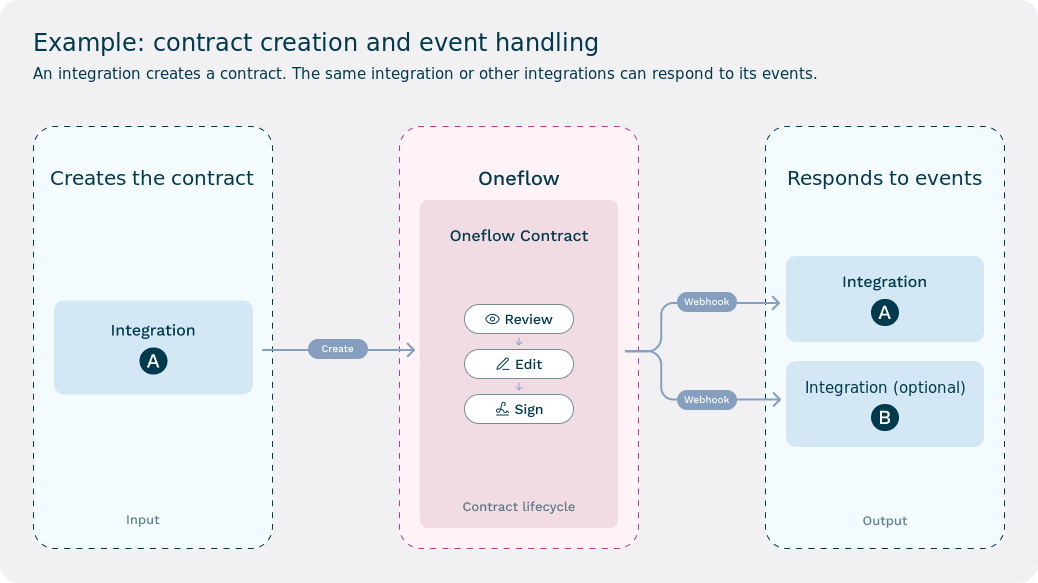
A common workflow is:
- A source integration creates a contract and supplies initial mapped values.
- Users review, negotiate, and update the contract in Oneflow.
- A relevant contract event occurs, such as the contract being signed.
- Oneflow sends notifications to webhooks whose event, workspace, and Blueprint filters match.
- Each receiving integration retrieves or uses the current contract values and performs its downstream action.
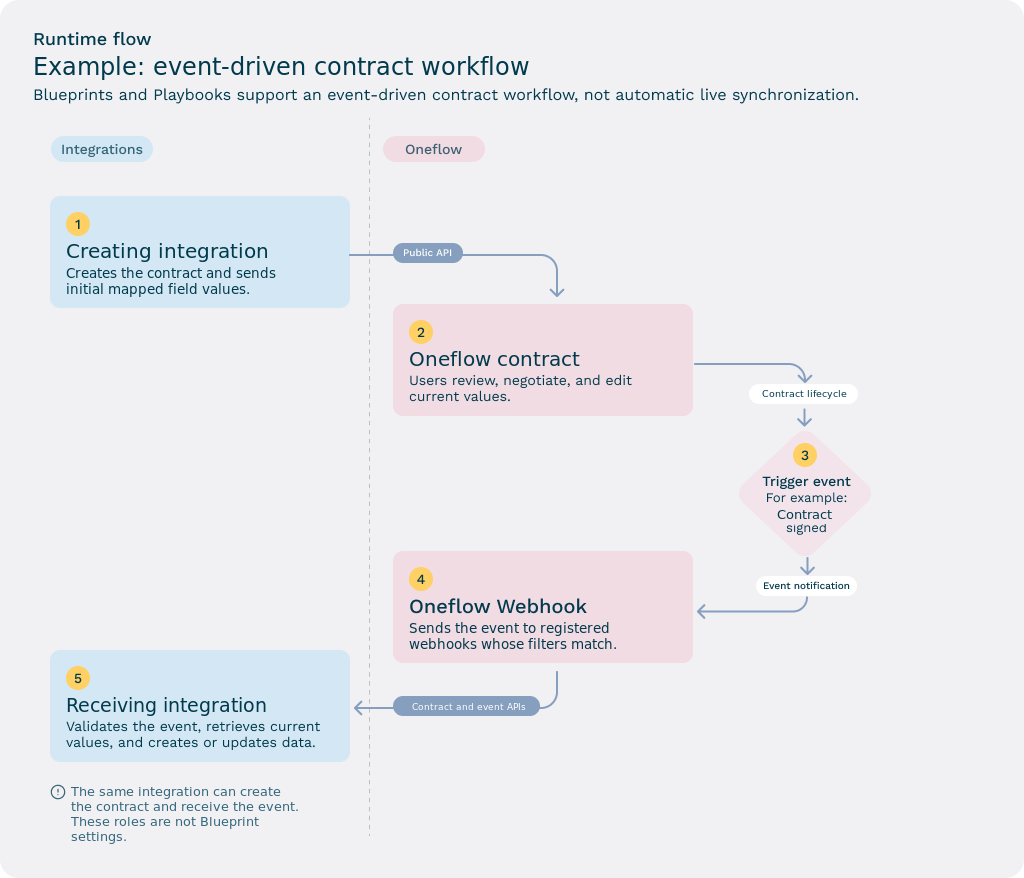
NoteSource and destination are workflow roles, not Blueprint settings.
The integration that creates the contract acts as its source. An integration that handles a later webhook acts as a destination. The same integration can do both. Connecting a Blueprint to a Playbook does not assign either role.
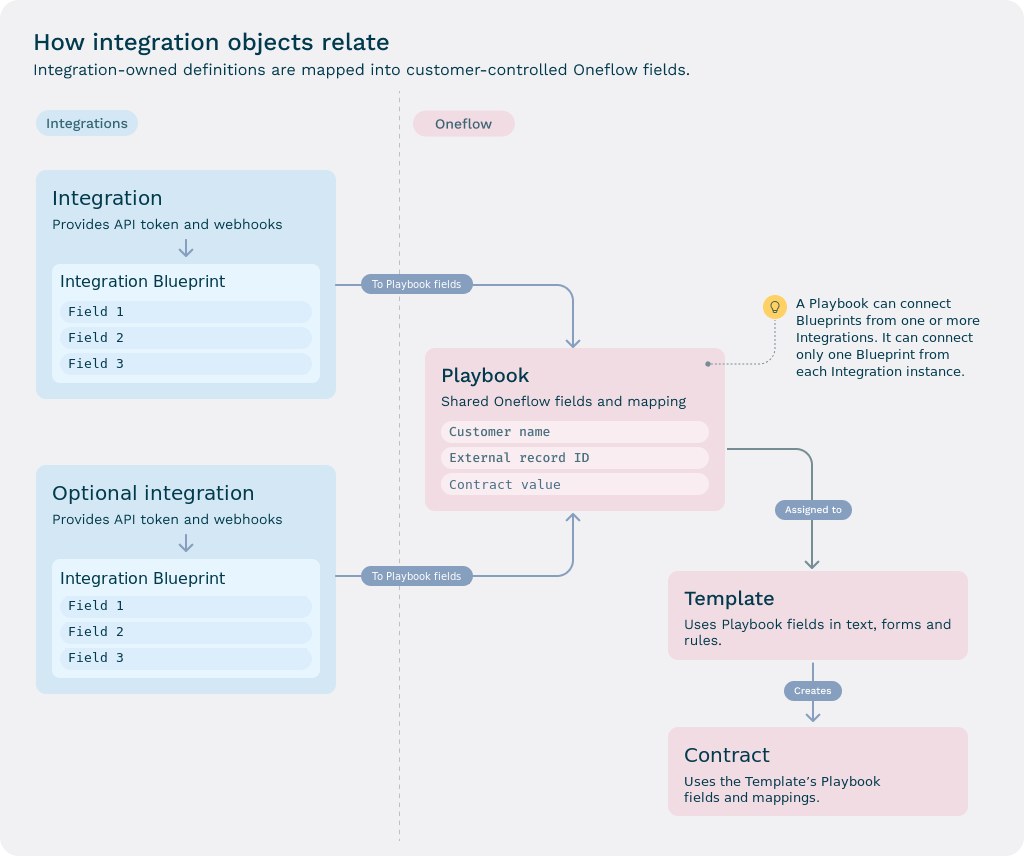
How the objects relate
| Object | Purpose |
|---|---|
| Integration | Represents an enabled connection to an external application. It scopes API tokens, webhooks, and Blueprints. |
| Integration Blueprint | Defines the fields understood by one integration for a particular workflow. |
| Playbook | Holds shared Oneflow fields. An administrator connects Blueprints and maps their fields to these shared fields. |
| Template | Selects a Playbook and uses its fields in reusable document content and configuration. |
| Contract | Contains the runtime values inherited from the Template and its selected Playbook. |
The connection between a Blueprint and a Playbook stores connection-specific behavior, including how existing and future Blueprint fields are added. Each individual field mapping links one Blueprint field to one Playbook field.
What you can build
Use Blueprints and Playbooks when you want to:
- Create a contract from a CRM and update the same deal after signing.
- Create a contract from a CRM and create an order in an ERP after signing.
- Create an employment contract from an ATS and create an employee in an HR system after signing.
- Send signed contract data to an archive, data warehouse, or automation platform.
- Let several integrations use the same Oneflow value while keeping their own stable field identifiers.
- Add fields for Oneflow document rules, form fields, or internal metadata without exposing them to every integration.
Example patterns include:
- ATS -> Oneflow -> HR system
- CRM -> Oneflow -> ERP
- CRM -> Oneflow -> archive or storage system
- Custom application -> Oneflow -> automation platform
What this model is not
The Blueprint and Playbook model is designed for contract lifecycle automation. It is not:
- A generic live two-way synchronization engine.
- A way for two systems to merge data into the same contract creation request at the same time.
- An automatic record-matching engine for external systems.
- A guarantee that every integration enabled in an account can read every Oneflow field.
If you need continuous synchronization, validation against an external source, or automatic record matching, implement that behavior explicitly in your integration.
Why Blueprint and Playbook are separate
The legacy Template Group combined two responsibilities:
- It defined technical field identifiers used by an integration.
- It defined the Oneflow fields assigned to a Template.
That model worked when one integration controlled the entire field set. It became difficult when several integrations needed to work with the same contract because every integration needed its own identifiers and field requirements.
The current model separates these responsibilities:
- The Integration Blueprint is the integration-facing interface definition.
- The Playbook is the customer-facing shared field and mapping layer.
For example, a CRM can identify a value as crm_deal_amount, while an ERP identifies the same shared value as erp_invoice_amount. Both Blueprint fields map to one Playbook field, such as Contract value.
Where to go next
- Read Key concepts to understand data flow, source of truth, field visibility, and record association.
- Read Core building blocks for detailed object definitions and API coverage.
- Follow Quick start: Blueprints and Playbooks to configure and test a workflow.
- Read Migration guide if your integration currently uses Template Groups.
Updated about 2 hours ago